
Checklist for Optimizing Brand Architecture
Quick Summary
The article emphasizes the importance of clear brand architecture to avoid losing money due to customer confusion. It suggests treating brand architecture as a clarity check by mapping out every brand and offer, testing if customers and teams can easily explain them, choosing the simplest model that fits, and establishing rules to maintain clarity. Before investing more in marketing or design, it recommends auditing the entire portfolio, including the parent brand, sub-brands, product lines, service names, and any outdated labels still in use.
If people can’t tell what you sell in 10 seconds, your brand setup is costing you money. I’d treat brand architecture like a clarity check: map every brand and offer, test whether customers and teams can explain it, pick the simplest model that fits, and set rules so the mess doesn’t come back.
Here’s the short version of what I’d look at before spending more on marketing or design:
- Audit the full portfolio: parent brand, sub-brands, product lines, service names, and old labels still in use
- Check consistency: logos, colors, type, naming, website pages, sales decks, email templates, and social profiles
- Look for overlap and holes: offers aimed at the same buyer with near-identical messages, or markets you miss
- Measure performance: awareness, loyalty, revenue by brand, cross-sell, bounce rate, conversion rate, and guideline use
- Pick the right model: branded house, house of brands, endorsed brand, or hybrid
- Decide naming rules: when a new offer should stay under the main brand vs. get its own sub-brand
- Roll out in phases: start with top-traffic assets, then move to lower-priority items over 30 to 90 days
- Set ownership: decide who approves names, assets, and exceptions, then review the system each quarter or year
A few facts stand out to me. The article points to 4 main architecture models, 4 KPI groups, and a phased rollout that starts on launch day and can stretch past 90 days. That tells me this is not just a design task. It affects sales, site navigation, cost control, and how well people move through your offers.
Brand Architecture: Building Brands to Last
Quick comparison
| Area | What I’d check | What a problem looks like |
|---|---|---|
| Structure | Brand-to-product relationships | Too many names with no clear order |
| Messaging | What each offer is for and who it serves | Teams explain the company in different ways |
| Visual system | Logos, colors, type, layouts | Website, decks, and social feel unrelated |
| Performance | Revenue, conversion, cross-sell, loyalty | Brand work does not show up in business results |
| Governance | Approval rights and review cycles | Teams make new assets or names without control |
Our takeaway: keep the setup simple, easy to explain, and easy to police. If a name, page, or visual element adds confusion instead of helping people choose, I’d cut it.

Step 1: Audit Your Current Brand Structure
If any of the warning signs above fit your business, start with a full audit of the structure you have today.
Map Every Brand, Sub-Brand, and Product Relationship
First, document the brand structure you already have. Put together a simple tree diagram that shows how your parent brand links to each sub-brand, product line, and main offer. Add legacy names, service lines, taglines, and short-term labels too. Then note where each one shows up: your website, packaging, sales decks, proposals, social media, email, and internal templates.
Once you’ve mapped it all out, check whether the structure looks and works the same way across those touchpoints.
Check Visual and Naming Consistency Across Touchpoints
Pull screenshots and samples from your main touchpoints – your homepage, the last 30 social posts, email templates, sales proposals, and business cards. Review them side by side. If they don’t feel like one brand, consistency is off.
Look closely at:
- Logos: primary, secondary, and icon versions
- Color codes: HEX, RGB, CMYK, and Pantone
- Typography
- Naming patterns
A lot of brand drift comes from old files and weak version control.
Here’s a simple test. Show your homepage to someone outside the company for 10 seconds. Then ask what you do and who you serve. If they can’t answer in plain English, your positioning isn’t clear.
After the visual review, check whether the portfolio also makes sense from a business standpoint.
Review Market Coverage, Overlap, and Gaps
Next, look at whether each brand or product line serves a clear audience, price point, or use case. Watch for sub-brands going after the same customer with almost the same message. That splits demand and weakens share. Then check for the reverse problem: parts of the market your portfolio doesn’t reach at all.
Ask your sales team to explain how the business units fit together. If they stumble or give different answers, the architecture is too complex.
If the portfolio doesn’t clearly separate audiences and offers, move to measurement before you make structural changes.
Step 2: Measure Whether the Architecture Is Working
Once you’ve mapped the structure, the next job is simple: see if it actually works.
Use the Step 1 audit map to check whether the setup helps customers choose, buy, and come back. Then use what you find to decide if the structure needs a tune-up or a full swap.
Test Customer Clarity and Navigation
After you make changes, run the same test again and compare the results. The goal is to see how fast people understand what you offer. If they can’t quickly explain what you do and who you serve, the architecture is too hard to follow.
Watch for the moments where people pause, leave, or ask for help. Those friction points tell you a lot.
It also helps to listen to how customers talk about you. The words they use in referrals often show how the market sees your brand. Compare your intended position with the language that shows up in reviews, testimonials, and social mentions.
If your sales or support team keeps fixing the same misunderstandings, that’s a clear signal the architecture isn’t doing its job.
Track Brand, Revenue, and Efficiency Metrics
A better structure should show up in the numbers.
Start with brand-level measures like awareness, preference, and loyalty. Then move into business results: revenue by brand, profitability, market share, and cross-sell performance. On top of that, a cleaner structure should cut duplicated work and make it easier to reuse assets.
Track these KPI groups:
| KPI Category | Example Metrics |
|---|---|
| Brand Performance | Awareness, preference, loyalty, sentiment/reputation |
| Business Impact | Revenue by brand, profitability, market share, cross-sell performance |
| Digital Efficiency | Bounce rate, session duration, conversion rate, SEO visibility |
| Governance/Risk | Template adoption rate, brand guideline compliance, internal alignment score |
Don’t just look for the best numbers. Look at the weakest signals. That’s often where the next structure choice becomes obvious.
Score Governance and Reputational Risk
When approval is loose, new names and assets start popping up with no clear order. That’s when things get messy.
Check whether decision rights are clear. For example:
- Who approves new sub-brand names
- Who signs off on updated assets
- Who owns the brand guidelines
If the answers change depending on who you ask, or teams ignore the guidelines altogether, governance is broken.
You should also look at reputational risk across the full portfolio. A broken customer journey, mixed tones, and mismatched visuals chip away at trust. And one weak offer can hurt the equity of the broader brand.
Use that score to rank the weakest areas first. Those trouble spots usually show where the new hierarchy needs tighter control.

Step 3: Choose the Right Brand Architecture Model
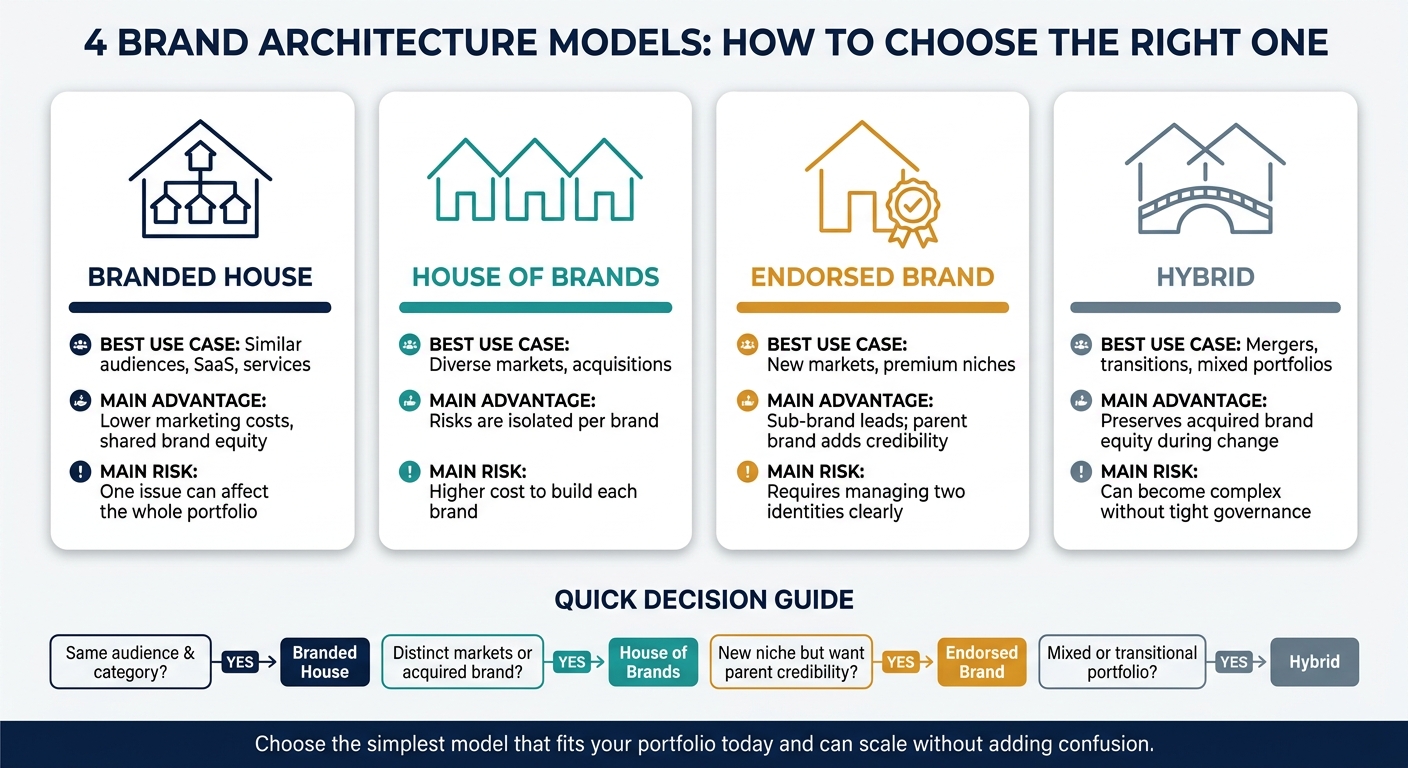
4 Brand Architecture Models: How to Choose the Right One
Use your audit and KPI findings to pick the simplest setup that works for your portfolio today and can grow without making things messy later. The goal is pretty simple: match the model to the problems you found, whether that’s overlap, fuzzy ownership, or weak separation between offers.
Compare the Four Brand Architecture Models
Look at these four models through three lenses: audience overlap, category distance, and risk.
| Model | Best Use Case | Main Advantage | Main Risk |
|---|---|---|---|
| Branded House | Similar audiences, SaaS, services | Lower marketing costs, shared equity | One issue can affect the whole portfolio |
| House of Brands | Diverse markets, acquisitions | Risks are isolated per brand | Higher cost to build each brand |
| Endorsed Brand | New markets, premium niches | Keeps the sub-brand primary while using the parent brand as support | Requires clear management of two identities |
| Hybrid | Mergers, transitions, mixed portfolios | Preserves acquired brand equity during change | Can become complex without tight governance |
Once you choose the model, make the next call: does the next offer need a simple extension, or does it need its own sub-brand?
Brand Extension vs. New Sub-Brand: How to Decide
A brand extension stays under the current name. A new sub-brand gets its own identity.
Go with an extension when the new offer fits your current audience and sits in a similar price range. Choose a sub-brand when the audience, price point, or risk level is different enough that some distance makes sense.
| Criteria | Choose Brand Extension If… | Choose New Sub-Brand If… |
|---|---|---|
| Audience | Same or very similar to your core | Distinct segment with different needs |
| Pricing | Similar to your existing range | Significantly higher or lower |
| Investment | Budget is limited; leverage existing equity | Sufficient budget to build new awareness |
| Operational Burden | Teams can scale it within current systems | Separate management is feasible and justified |
| Risk Profile | Low chance of negative spillover | High-risk or regulated category needing isolation |
Once that naming decision is made, set the visual order before the design team starts making assets.
Set Naming and Visual Hierarchy Rules
Naming and hierarchy should make the portfolio easier to scan. If they don’t, they’re doing the opposite of their job.
A scalable naming system uses a clear structure: Brand + Product Family + Variant + Size/Format (for example, Brand X Daily Moisturizer SPF 30). That structure keeps the portfolio easy to read as it grows. It also stops teams from making up names on the fly that don’t match the rest of the system.
On the visual side, define the smallest readable logo mark – the symbol or initial that still works when shrunk down to a favicon or a small product label. In a Branded House, the master brand logo leads at every touchpoint. In an endorsed model, the sub-brand logo comes first, while the parent brand shows up as a secondary seal of quality.
Put logo versions, color values, and naming rules into one standards guide. If you skip that step, names and visuals tend to drift fast.



Step 4: Roll Out, Govern, and Maintain the New Structure
Once the structure is set, the next part is where things either hold together or fall apart. A new brand system doesn’t stick just because it’s mapped out well. It sticks because the rollout is paced, ownership is clear, and the rules are easy to follow.
Roll Out Changes in Phases
You don’t need to flip everything at once. In fact, doing too much on day one is usually how teams get buried. A tiered priority system helps you roll out the work in a sane order and keeps the highest-visibility assets first.
| Rollout Phase | Timeframe | Assets |
|---|---|---|
| Priority 0 | Launch Day | Homepage, product UI, master sales deck |
| Priority 1 | Within 30 Days | Paid ads, email templates, social profiles |
| Priority 2 | Within 90 Days | Training materials, resource hubs, help center content |
| Priority 3 | Ongoing | Archived content, print inventory |
Before you push changes across every channel, it can help to do a soft launch in one market or sub-brand first. That gives you room to spot problems before they spread everywhere. And while you’re at it, check for orphaned assets – old-brand error messages, evergreen creative, or legacy contracts that may still be floating around.
Set Governance Rules and a Review Schedule
Once the rollout plan is in place, decide who gets to approve exceptions and when the system gets checked.
Governance needs to be plain and specific. Put a small cross-functional team in charge – marketing, operations, and IT at minimum – to own brand calls and approve exceptions. Don’t just document what’s allowed. Document who signs off when something falls outside the rules. If that part is fuzzy, teams start making judgment calls on their own.
Set a review rhythm and keep it steady: quarterly for high-traffic assets like the homepage and top sales materials, biannually for visual consistency across channels, and annually for a full audit of positioning, voice, and competitive context. One of the clearest signs that governance is slipping is when packaging, digital, and sales decks start feeling like they came from different companies.
Connect Architecture to Design Systems and Product Experience
The hierarchy shouldn’t live only in brand docs. It needs to show up inside the product too.
The hierarchy shouldn’t live only in brand docs. It needs to show up inside the product too.
Keep approved files, naming rules, and components in one living system. Tools like Figma and a DAM platform make it easier for teams to use the right assets without someone policing every file. Before the full rollout, test the structure with mock-ups across your website, app shell, and social media to make sure the hierarchy is clear when people see it in action.
Conclusion: A Short Checklist for Keeping Brand Architecture Clear
Once your structure is live, keep it simple, visible, and well managed. Audit what already exists, measure what performs well, pick the simplest fit, and handle changes the same way every time.
Before you approve any brand element, ask one plain question: Does this make navigation easier, or does it add confusion? If it doesn’t add clarity, cut it.
A checklist means little if no one follows it. Keep assets in one source of truth, give each area a clear owner, and stick to a set review schedule. If your team can explain the structure in plain English, customers usually can too.
Build a Brand That’s Ready to Grow
Visual Soldiers helps companies simplify their brand structure, sharpen their positioning, and build scalable identity systems that stay consistent across every touchpoint.
Ready To Bring Clarity To Your BrandFAQs
Your brand architecture is probably too complex if teams and customers can’t clearly explain how your products or services fit together.
Common signs show up fast: inconsistent messaging, confused prospects, sub-brands that seem to compete with each other, product launches that feel like starting from zero, fragmented customer experiences, redundant marketing spend, and internal friction where even small decisions need leadership approval.
It comes down to two things: how closely your offers fit together and how much you want them tied to the same brand.
If most of your products serve the same audience and you want one clear, unified message, go with a Brand House.
If your products or services serve different markets, or they’re different enough that you don’t want them sharing brand equity, a House of Brands makes more sense.
And if you’re in the middle of a shift, a Hybrid model can be a smart middle ground. You can test it first before doing a full rollout.
Start with legal and day-to-day changes like contracts, licenses, and financial documents.
Then move to launch-critical assets such as your homepage, master sales decks, product UI, and main customer touchpoints. Finish technical work like redirects, tracking codes, backups, and content updates before go-live. After that, update marketing templates, digital assets, and announcements.

Visual Soldiers
Visual Soldiers is an Atlanta-based creative studio specializing in branding, design & digital experiences.